> For the complete documentation index, see [llms.txt](https://notes.sfoffo.com/llms.txt). Markdown versions of documentation pages are available by appending `.md` to page URLs; this page is available as [Markdown](https://notes.sfoffo.com/web-applications/web-attacks/oauth-attacks.md).
# OAuth Attacks
OAuth is a standard designed to enable secure authorization between services and applications. It is widely used in Single Sign-On (SSO) scenarios, where a user can authenticate once and access multiple applications without sharing their credentials with each service.
OAuth Basic Overview
#### OAuth Entities
The OAuth protocol defines the following entities:
* ***Resource Owner*** - Typically the user who owns the protected resources.
* ***Client*** - The application requesting access to the resources on behalf of the user.
* ***Authorization Server*** - The server responsible for authenticating the user and issuing access tokens.
* ***Resource Server*** - The server hosting the protected resources.\
It can be the same as the authorization server, or a separate one.
***
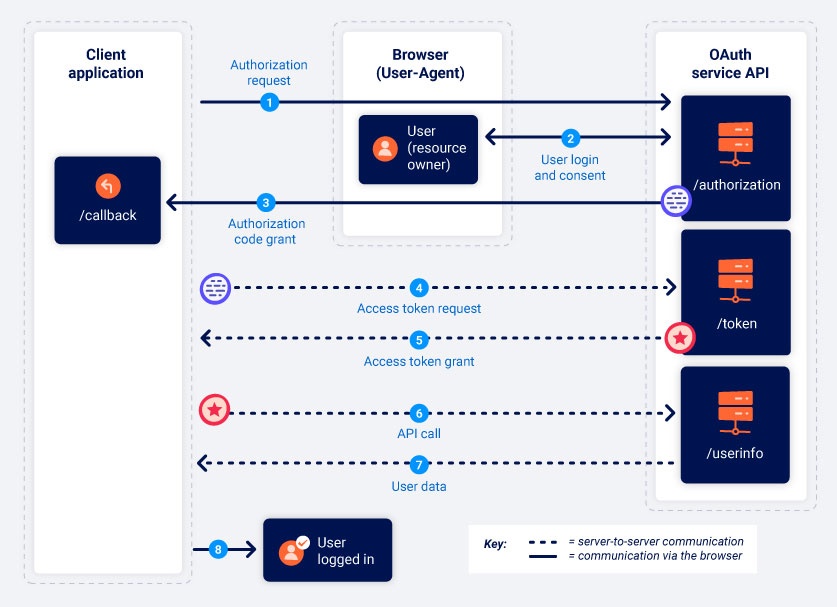
#### OAuth Standard Communication Flow
The communication flow between the previous entities works as follows:
1. The client requests authorization from the user.
2. The user consents to giving access to their profile to the third-party service, granting authorization.
3. The client presents the authorization grant to the authorization server.
4. The client receives an access token from the authorization server
5. The client presents the access token to the resource server
6. The client receives the resource from the resource server
***
#### **Authorization Code Grant**
The **authorization code grant** is the most common and secure OAuth flow. It strictly follows the standard OAuth process and ensures that sensitive tokens are exchanged server-to-server rather than through the user’s browser.
#### Implicit Code Grant
The **implicit grant** is a simplified OAuth flow intended for clients that cannot securely store a client secret (typically browser-based JavaScript applications). This grant type is less secure because the access token is sent from the OAuth service to the client application via the user's browser as a URL fragment.
***
## Identifying OAuth authentication
To identify whether an application uses OAuth, look for options to log in with an external account.
All OAuth flows begin with a request to the `/authorization` endpoint, which includes parameters like `client_id`, `redirect_uri`, and `response_type`.
{% hint style="info" %}
`response_type` can either be `code` to use standard authorization or `token` to use the (insecure) implicit grant authorization flow
{% endhint %}
If a third-party OAuth provider is involved, its hostname in the authorization request usually reveals which service is being used, and its public documentation can expose details about endpoints and configuration.
After identifying the authorization server’s hostname, it is useful to probe the standard discovery URLs:
* `/.well-known/oauth-authorization-server`
* `/.well-known/openid-configuration`
These often return JSON configuration files that reveal supported features, additional endpoints, and other information that can expose a broader attack surface than what is documented.
***
## Stealing Access Tokens
{% hint style="success" %}
This vulnerability occurs when the `redirect_uri` is not properly verified by the authorization server.
{% endhint %}
An attacker can steal a victim's access token by manipulating the `redirect_uri` parameter to make redirect the user to a server they own. In particular:
1. The attacker needs to create a link for an `authorization request` that contains a manipulated `redirect_uri` and set the `state` parameter to an arbitrary value ***as long as it is always the same for the entire attack.***
2. The request's `client_id` parameter can be extracted by executing the OAuth flow with the attacker's credentials and re-using the client\_id.
3. After receiving the manipulated link, the user logs in and gets redirected to the attacker's server, sending them a request with the login parameters.
4. The attacker's server will show a request specifying the authorization code for the user's account
5. The attacker can now complete the OAuth flow and exchange the authorization token for a valid access token, thereby impersonating the victim.\
The attacker can easily achieve this by forging the access token request, since all required parameters are known: `/client/callback?code=&state=`
6. The remaining OAuth flow is completed by the client and authorization server in the background. The victim's access token is returned in the response. Since the attacker now owns a valid access token for the victim, they can use it to impersonate the victim
{% hint style="warning" %}
In real-world applications, the `redirect_uri` parameter is usually filtered. You can sometimes find misconfigured whitelists allowing any value that contains the hostname. Considering you are attacking `example.com` and own `attacker.server`, you can bypass the filters using redirect values such as:
{% endhint %}
```
https://example.com.attacker.server/callback
https://example.com@attacker.server
https://attacker.server/callback?a=https://example.com
https://attacker.server/callback#https://example.com
```
{% hint style="info" %}
A misconfigured `redirect_uri` parameter can also cause ***SSRFs and Open Redirects***!
{% endhint %}
***
## CSRF via missing state parameter
{% hint style="success" %}
The `state` parameter in the OAuth flow is an optional parameter that serves as an anti-CSRF measure.\
A missing (or improperly validated) state parameter easily leads to a CSRF vulnerability
{% endhint %}
Whenever an OAuth implementation lacks the `state` parameter in the authorization request, it is possible to perform a CSRF attack to cause the victim to be logged in as the attacker's account.
{% hint style="info" %}
While this may not seem like a useful attack, it might be a strong vector in some applications where the user might add personal data or credit card data to the attacker's account.
{% endhint %}
To execute the CSRF attack on an OAuth flow *without a state parameter*:
1. Get a valid authorization code your account by sending an authorization request and authenticating to the application.
2. Check the response to obtain the authorization code tied to your account and craft the callback link:\
`http://example.com/client/callback?code=`
3. Just like in a regular CSRF attack, the link will need to a user via other methods.
4. When a user clicks the provided link, their browser will automatically complete the OAuth flow, making them log in with the attacker's account.
***
## Reflected XSS
Sometimes, the authorization request:
{% code overflow="wrap" %}
```http
GET /authorization/auth?response_type=code&client_id=&redirect_uri=&state=
```
{% endcode %}
reflects back some (or all) parameters as hidden values in the response.
In that case, considering the vulnerability exists in the authorization request, it can potentially result in a full account takeover of a victim's account.
***